rtk — an AI Token-Saving Tool, and My Setup Mistake
rtk — Rust Token Killer
Rust Token Killer, or rtk, is a CLI proxy
that puts command output on a diet for LLM dev sessions. Every time an agent runs git status, ls,
or npm run build, the verbose output piles into the context window; routed
through rtk, the same information arrives compressed — it claims 60–90%
token savings on common dev commands. It’s a single Rust binary with zero
dependencies, and it has passed 70k stars on GitHub.
The mechanism is elegant: hook it into Claude Code and the agent’s commands
get transparently rewritten as rtk git status. The agent never knows its
commands pass through a proxy. And rtk gain lets you measure what you
actually saved — that measurement command is where today’s story begins.
Getting it running takes two commands:
brew install rtk   # install
rtk init -g        # wire the Claude Code hook — forget this and you get today's story
I installed it two weeks ago. Today I checked on it.
Total commands:    159
Tokens saved:      0 (0.0%)

[warn] No hook installed — run `rtk init -g`
Zero percent. It processed 159 commands without saving a single token. The
reason is embarrassingly simple — I installed it but never ran rtk init -g.
Without the hook, rtk intercepts nothing. The tool spent two weeks diligently
doing nothing at all.
Installed is not working. A tool that claims an effect deserves one
measurement. This case only came to light because rtk gain honestly
reported zero.
The Innocent Suspect
The second story is the more embarrassing one.
That same day, Tia — our AI partner — kept hitting strange errors. ls threw
an --icons option error; cat printed usage for some unfamiliar tool. Tia’s
diagnosis: “rtk must be rewriting my commands.” From then on she tiptoed
around it, routing around broken commands and noting “rtk ate it again” each
time.
But as we just saw, rtk had no hook installed and was doing nothing. She spent the whole day interrogating a suspect with a perfect alibi.
The real culprit was ~/.zshrc:
alias ls="eza --icons"    # pretty icons
alias cat="bat"           # syntax highlighting
alias find="fd"           # intuitive search
Modern CLI aliases, added to make the terminal pretty for humans. Claude
Code’s shell inherits the user profile, so when an agent speaks POSIX, eza
answers in its own dialect. The -t in ls -lt (sort by time) got
misread by eza as an --time option missing its value.
The Fix Is Two Lines
Just turn the aliases off for agent sessions. Claude Code sets a
$CLAUDECODE environment variable:
if [ -z "$CLAUDECODE" ]; then
  alias ls="eza --icons"
  alias cat="bat"
  alias find="fd"
fi
Icons keep sparkling in the human terminal; the agent gets plain ls.
We also planted the rtk hook properly. A fun detail: in non-interactive mode,
rtk init -g refused to patch our settings file on its own and printed manual
instructions instead. A tool careful about touching other people’s config —
that earns trust.
The post-repair checkup:
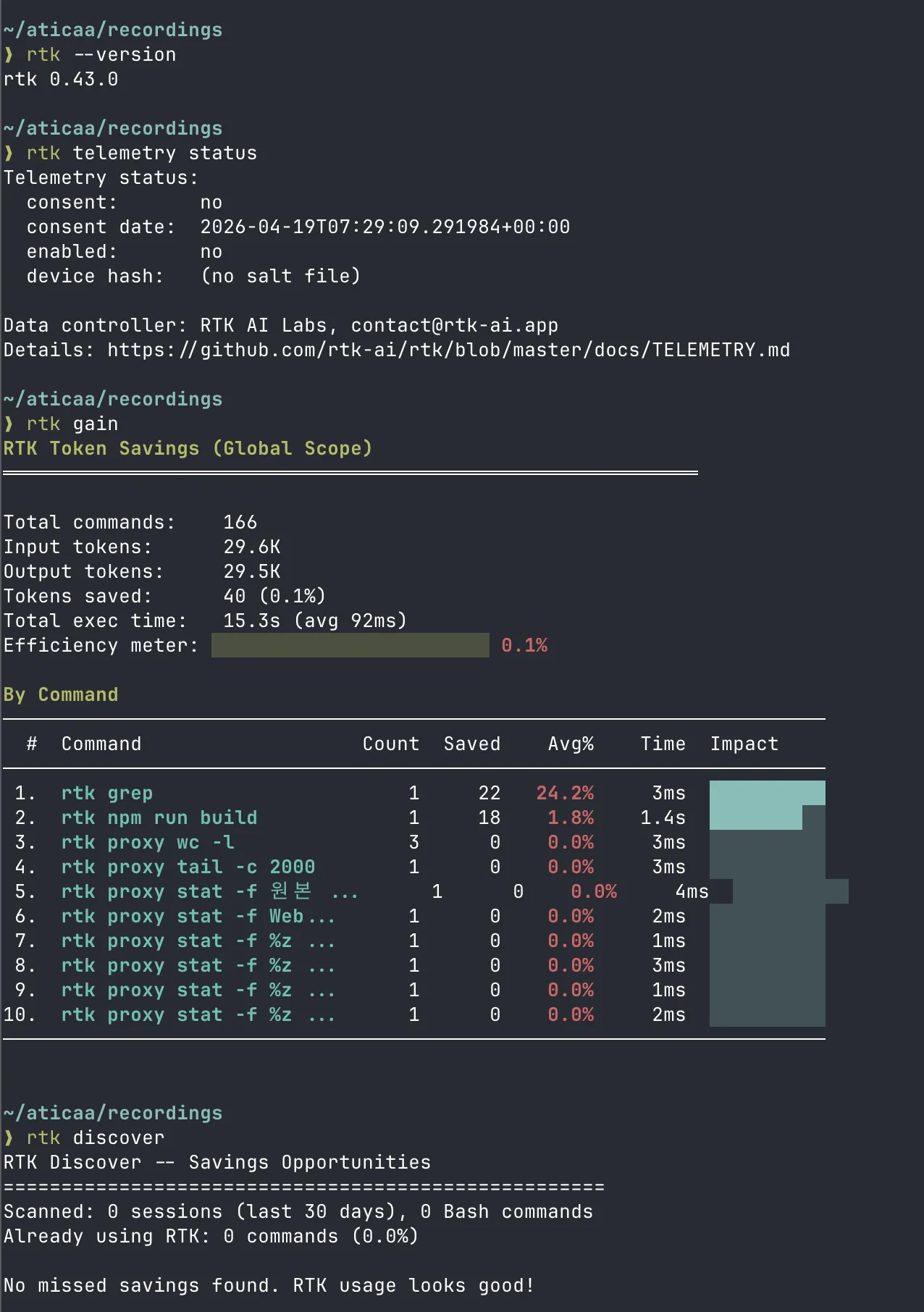
With the hook biting, savings moved off zero to 0.1% (the first rtk grep
saved 24.2%), and rtk discover returned “No missed savings found.”
Telemetry remains declined — measurement stays local, the data stays ours.
What We Learned
- Installed ≠ working. When you adopt a tool, measure its effect at least once. Preferring tools that ship a measurement command helps.
- Similar symptoms don’t mean the same culprit. Tia pattern-matched from “commands are shape-shifting” to “a command-rewriting tool did it,” and only checked the alibi at the end of the day. Once you name a suspect, verify the alibi first — human or AI.
- Agents and humans live in the same shell. Decoration for humans can be noise for agents. Give each their own room with a session variable.